Why you need a good homeserver
I’ll get into the how soon enough, but here’s why: You constantly have monthly bills you have to pay: from photos, to cloud-storage, to streaming services. On top of that, the tech giants have the ability to steal your data and share it to governments, advertisers and data brokers (almost all of them do this extensively). The home-server can replace it, and do much-more, without monthly re-occuring bills.
Now, lets calculate the cost of for example, Google Drive/Photos and Streaming Services.
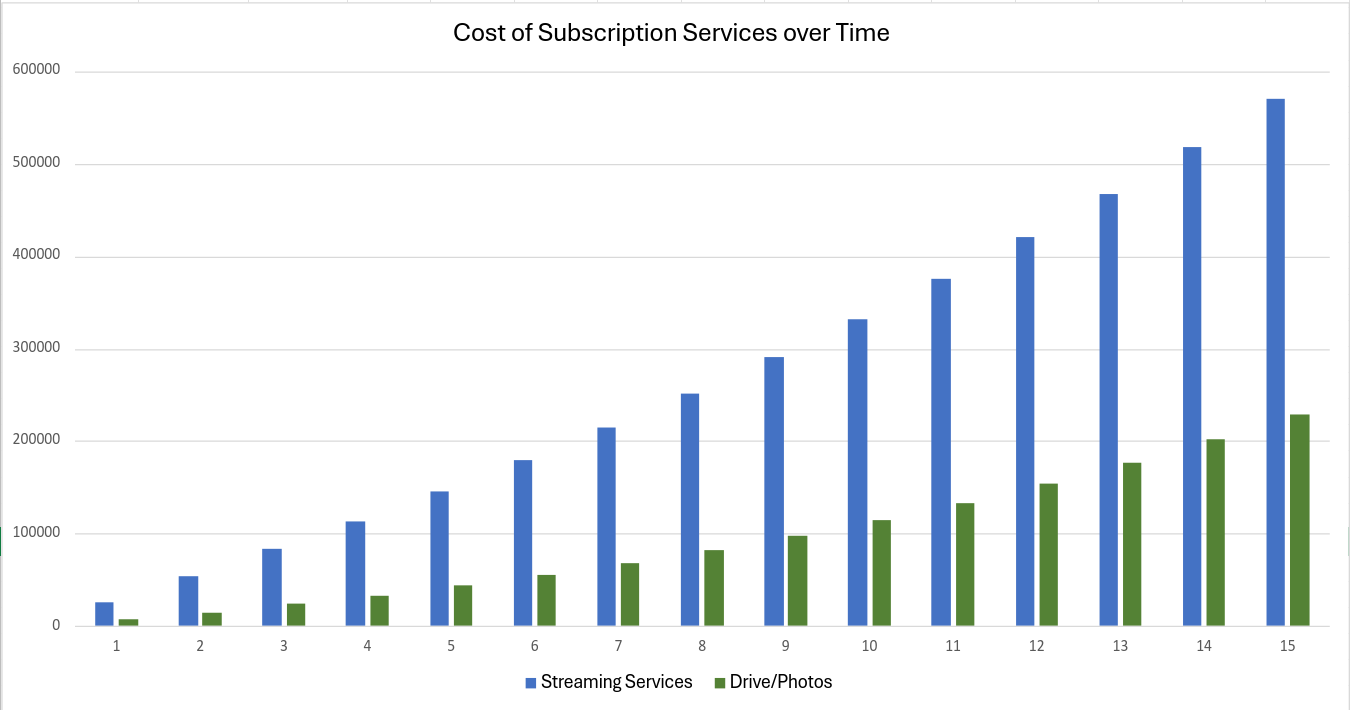
From this figure, we can see:
- Streaming Total: 569674
- Google Drive/Photos Total: 228762
- Total: 798436
Wow! Within 15 years of using these services it seems that the money you will have to pay these companies in total is around 5.69 lakhs for streaming services, 2.28 lakhs for Google Drive/Photos, and around 8 lakhs for both.
Selfhosting is much more economical, and gives you more control, even though it may look more expensive at the start.
You can also use the home server for much more, like a remote development environment, or a convenient place to store your backups.
How I’ll build you a good home server
This server will be accessible inside your house by all people on the same Wi-Fi network AND people outside the house if they download an app, have an internet connection, and you invite them into your Tailscale network (explained later).
If your power fluctuates, having an uninterruptable power supply is crucial or the server will randomly turn off, and you will have to be at your house and turn it back on.
The server architecture is simple: use a quad-core or higher arm SBC (single board computer) running your cloud, images, and (optionally, for extra fee) selfhosted netflix locally.
Here is an outline of the architecture:
Anyways, I can set this up for you, all the hardware, UPS, software and such for a price. You can find your price and configuration here: (you can contact me if you want an extra custom service and I will tell you whether it is possible or not)
After using the quote calculator, please submit your finalized configuration here.
The technology behind this
For the compute, we use a arm SBC. I've picked the Radxa Cubie A5E as it is octa-core, has 4GB of ram, can run a real operating system, and is hackable. To it, I've attached a microSD card as boot. However, no data is stored on this. Instead, it is simply used to bootstrap till boot using armbian then start an LXC container running Rocky Linux 10. This allows us to run whatever OS we want, and on the disk we want (external SSD), even though the Cubie is limited (it only supports Debian (armbian) 13, microSD card boot, and uBoot.)
To the Cubie, we use a UPS for an uninterruptible power supply. The power supply has (3) ports. One is used for the HDD(s) (they need a powered USB-Sata adapter), the other using a phone charger is the power supply for the Cubie (yes, this was the cheapest option and works well), and the last one for the router. As, no matter where you are, if your router is offline at home, your server will lose access to the local network and the internet and you will have no services :(.
We use open-source technologies that work well for the actual things you run. You can even set these up yourself for free (but it is difficult)! We use docker containers as they make things easier, are compatible, stateless, modular, and persistent. Here are the open-source technologies we use for each service: